See the low point
Know where upcoming income, bills, and plans may pull your balance down.
 Foreseenly™
Private cash-flow forecasting for Apple devices
Add upcoming paychecks, bills, and planned purchases. See your projected low point, then change the amount or timing and see what happens.
No bank connection required. Foreseenly models the information and assumptions you deliberately enter.
Real Foreseenly forecast
A $3,000 vacation before payday pushes this checking forecast below zero. Move the same purchase until after salary arrives and the picture changes immediately.
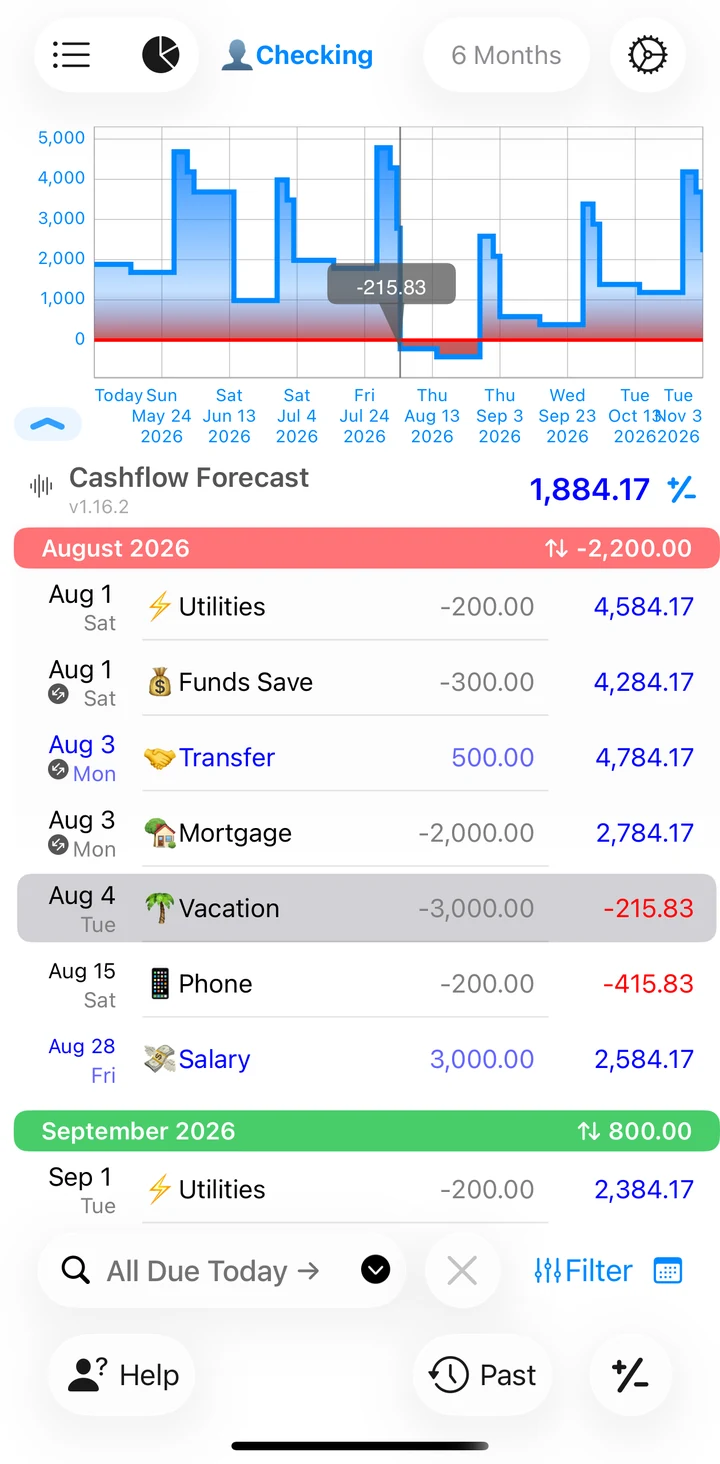
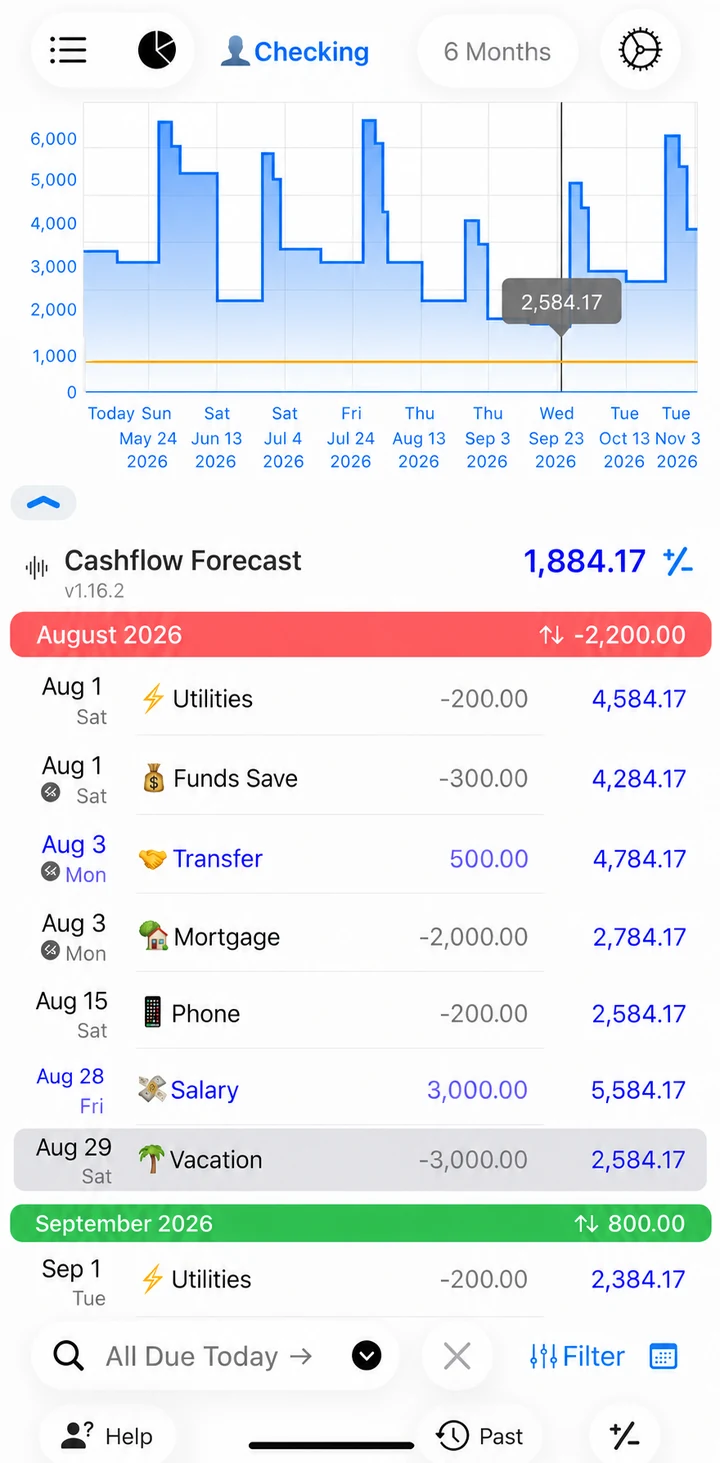
Same $3,000 purchase. Different timing. Moving the date changes the balance at that moment by $2,800.
Foreseenly does not predict unknown spending. It shows the consequences of the information and decisions you enter.
The decision loop
Foreseenly turns a financial decision into a visible cash-flow consequence before the money moves.
Know where upcoming income, bills, and plans may pull your balance down.
Add the purchase, payment, or timing change you are considering.
Change a date or amount and see how the projected balance responds.
1 minute 44 seconds
A short explainer on projected balances, timing, and how changing one decision can change the cash-flow outcome.
Open video directly · Watch on YouTube →
Foreseenly models the information and decisions you enter. It does not predict unknown future spending.
Your monthly budget says you are fine, but your bank balance can still get dangerously low. Why? Because a budget tracks total money. But your balance is driven by when that money moves.
As an example, imagine a three-thousand-dollar vacation. If it hits before payday, your balance drops below zero, even if you planned for it, creating a cash shortfall. But move that same purchase until after your salary arrives and you stay comfortably positive throughout the whole month.
Same purchase. Different timing. Look at the difference: about twenty-eight hundred dollars when the purchase hits at the right time. Timing changes everything.
That is what a cash-flow forecast reveals. Instead of asking, "Can I afford this?" you ask, "What happens to my balance if I do this on this specific date?" It is about seeing the impact before you act.
A forecast applies known events according to when they occur and shows how the balance may change over time. A forecast plots every bill and paycheck to highlight your projected low point. It is a decision tool. Change the timing and see how the balance responds.
Foreseenly is not predicting unknown spending. It highlights the consequences of your planned future actions. You are modeling the consequences of the information and decisions you already know.
Foreseenly is built specifically around this future-balance view without ever needing to connect your bank. No financial-data sharing with third parties, just your device and optional sync to your private iCloud account.
See the low point. Test the decision. Adjust before you commit. Check your forecast today.
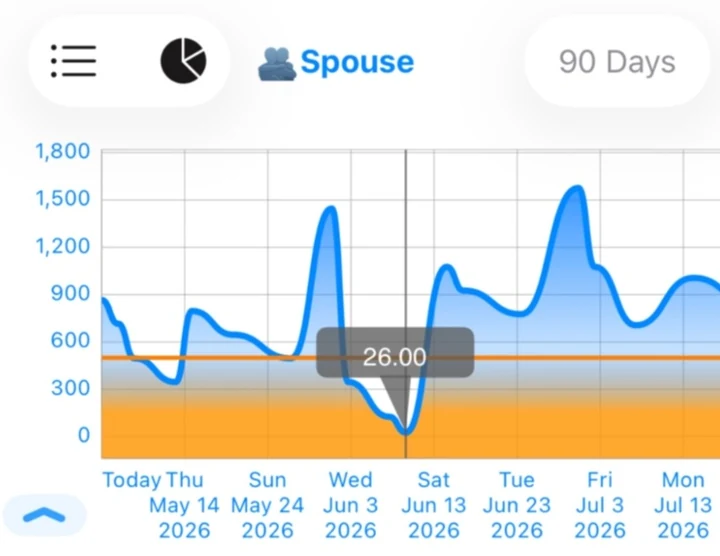
Projected low point
Monthly income can exceed monthly expenses while timing still creates a dangerous low point.
Foreseenly focuses on the balance you are heading toward, not only whether the month adds up.
Intentional inputs
Foreseenly only needs the information that affects the future you want to model.
You do not need to log every coffee or recreate every purchase. Reconcile your current balance when needed, then keep the forecast focused on the income, bills, obligations, and decisions that affect what happens next.
Less automation. More control. No financial-data aggregation.
Private by design
Privacy follows from how Foreseenly works. You can forecast without giving QApps or a bank-data aggregator possession of your financial-planning data.
Focused on what happens next
Foreseenly is not trying to be an everything dashboard. It is optimized for seeing what a planned decision does to future cash availability.
| Typical connected finance workflow | Foreseenly |
|---|---|
| Connect accounts | Start with the balances you choose |
| Import financial history | Enter what matters to your future |
| Analyze and categorize activity | Model upcoming cash flow and decisions |
| Broad financial dashboard | Focus on future balance timing |
| "How are my finances doing?" | "What happens if I do this?" |
Useful when timing matters
Common questions
A future balance app shows how upcoming income, bills, debt payments, irregular expenses, and planned purchases may change your account balance over time. Foreseenly is built around this cash-flow forecasting view.
Yes. Start with your current balance and enter the future cash flows you want included. Foreseenly applies them by date and shows how the projected balance changes over time.
No. Foreseenly does not require bank credentials, Plaid, or another financial-data aggregator.
No. QApps does not receive your transaction, account, balance, plan, or other financial-planning data. Optional synchronization between Apple devices uses your private iCloud account.
Yes. Add the planned expense, see the resulting projected balance, then change the amount or timing and compare the forecast before you spend.
Foreseenly can model planned cash flows up to 15 years ahead. Longer forecasts reflect the assumptions you enter; they are not predictions of unknown future spending.
Foreseenly can support budgeting decisions, but its primary job is cash-flow forecasting: showing how known future events and planned decisions may affect balances over time.
See where your balance may dip. Test the decision. Adjust the timing.
Download on the App StoreForeseenly™ Cash Flow Forecast is available for iPhone, iPad, Mac, and Apple Watch.